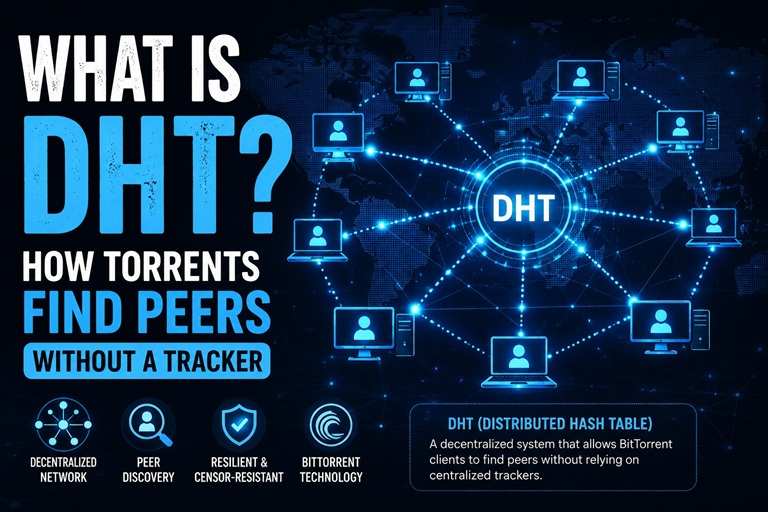
Every torrent needs a way to find other people sharing the same file. Most explanations stop at "trackers do that" — but trackers are optional, and torrents without a single working tracker still connect just fine. The reason is DHT: a distributed, trackerless system that every modern torrent client participates in automatically, whether you notice it or not.
What DHT Actually Is
DHT stands for Distributed Hash Table. It's not a server, a website, or a company-run service — it's a shared address book maintained collectively by millions of torrent clients running right now. No single computer owns it, no single computer can shut it down, and there's no "DHT website" to visit because DHT isn't a place, it's a protocol every client speaks to every other client.
The "hash table" part means it stores information as key-value pairs: the key is an info hash (the same 40-character fingerprint found in every magnet link), and the value is a list of IP addresses currently sharing data for that hash. When your client asks the DHT network "who has this info hash?", it isn't querying one server — it's asking a rotating set of nearby peers, who each know a little piece of the overall picture.
How DHT Finds Peers, Step by Step
- Your client joins the DHT network. The first time your torrent client starts, it connects to a small set of well-known "bootstrap" nodes to get its bearings — after that, it learns about more nodes organically from every torrent it touches.
- It calculates which nodes are "close" to your info hash. DHT uses a mathematical distance measurement (not physical distance) between node IDs and info hashes. Nodes whose ID is numerically close to the info hash are more likely to know who's sharing that content.
- It queries those nodes, which often point to other nodes. This is iterative — your client might ask 5-10 nodes in sequence, each one narrowing the search, until it finds nodes that actually have peer information for that exact info hash.
- It receives a peer list and connects directly. Once DHT returns IP addresses and ports of people sharing the content, your client connects to them using the standard BitTorrent protocol — DHT's job ends there.
This entire process typically takes a few seconds, which is why magnet links with no tracker URLs at all still work, just sometimes slightly slower to start than ones with trackers attached.
DHT vs Trackers: What's the Actual Difference
| DHT | Tracker | |
|---|---|---|
| What it is | A decentralized network of peers themselves | A dedicated server |
| Who runs it | No one — it's the collective swarm | Someone hosts and maintains it |
| Can it go offline? | No — there's no single point of failure | Yes — if the server goes down, that tracker stops working |
| Speed | Usually a few seconds slower to bootstrap | Often faster for an immediate peer list |
| Requires being listed in the torrent? | No — works for any info hash automatically | Yes — the magnet/torrent must include that tracker's URL |
In practice, they're not competing systems — they work together. A magnet link with several tracker URLs attached gets a fast initial peer list from those trackers while DHT works in the background as a permanent fallback that never goes offline. This is also why tools that inject extra public trackers into a magnet link genuinely help: more trackers means more independent, faster paths to an initial peer list, on top of DHT running regardless. For more on how this metadata resolution works end to end, see how torrent metadata works.
Why Some Torrents Have DHT Disabled
A small number of "private" torrents explicitly disable DHT. This isn't a technical limitation — it's a deliberate choice by private tracker communities to keep their content from being discoverable outside their own invite-only tracker, since DHT would otherwise let anyone with the info hash find peers regardless of whether they're a member of that private community.
Frequently Asked Questions
Does DHT mean my torrent has no privacy?
DHT itself doesn't add or remove privacy beyond what BitTorrent already involves — your IP address is visible to peers you connect with either way, with or without DHT. If privacy from peers and trackers matters to you, that's a separate consideration from how peer discovery happens.
Can I turn off DHT in my torrent client?
Yes, most clients (qBittorrent, Transmission, Deluge) have a DHT toggle in settings. Turning it off means you'll rely only on whatever trackers are listed in the torrent or magnet link — useful for private-tracker use, but it can slow down or prevent connections for magnet links with few or no trackers.
Why does a magnet link sometimes take longer to start than a .torrent file?
A .torrent file already contains the full metadata, so your client can start immediately. A magnet link has to resolve that same metadata first — through DHT, trackers, or both — before downloading can begin, which is usually a few seconds but can take longer if peer availability is low. If it never resolves, see magnet link not working: 10 fixes.
See DHT in Action
Use the free Magnet to Torrent Converter to see how trackers and metadata resolution work together — paste any magnet link to get direct .torrent download links with extra public trackers injected. Going the other direction? Use Torrent to Magnet to extract a magnet link from any .torrent file.