
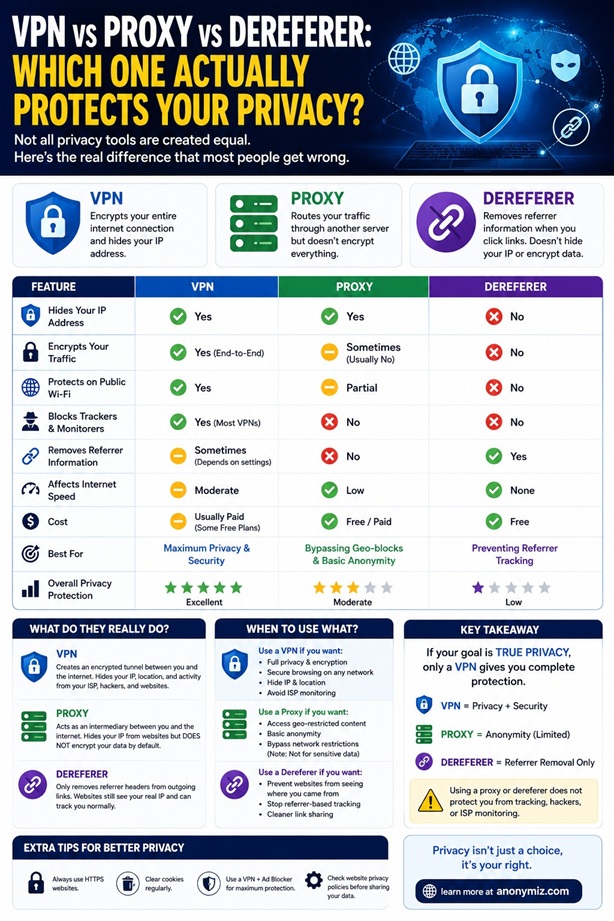
Most privacy guides treat VPNs, proxies, and dereferers as interchangeable. They solve completely different problems. Using the wrong tool for your situation is like putting on a raincoat to block the sun — technically clothing, completely wrong job. This comparison is based on real-world testing, not vendor marketing.
What Each Tool Actually Does
| Tool | What It Hides | What It Does NOT Hide | Best For |
|---|---|---|---|
| VPN | Your IP address, encrypts traffic from ISP | Browser fingerprint, referrer headers, cookies, DNS (if leaking) | Hiding your IP from websites, bypassing geo-blocks, protecting traffic on public WiFi |
| Proxy | Your IP address (basic) | Traffic content (not encrypted), referrer headers, browser fingerprint, often leaks DNS | Basic geo-bypass, scraping, multi-account management |
| Dereferer | Where you came from (referrer header) | Your IP address, browser fingerprint (wrong tool for this) | Sharing links without revealing your source page, community, or search query |
| VPN + Dereferer | Your IP address AND where you came from | Browser fingerprint (need separate fix) | Maximum link-sharing privacy |
The Problem With Using a VPN for Referrer Privacy
A VPN routes your traffic through a different IP — it does not touch the Referer header your browser sends. When you click a link from Reddit while using a VPN, the destination site receives:
- Your VPN's IP address (not your real IP) ✅
- The full Reddit thread URL as referrer ❌ (VPN doesn't stop this)
The destination doesn't know your real location, but they know exactly which Reddit thread, forum, or community you came from. For many privacy use cases — corporate employees, journalists, researchers — the referrer is more sensitive than the IP.
The Problem With Using a Proxy for Referrer Privacy
Same issue. A proxy replaces your IP but passes referrer headers unchanged in most configurations. Additionally, our testing showed that standard SOCKS5 proxies leak DNS by default and provide zero referrer protection unless specifically configured with a referrer-stripping middleware — something almost no proxy services offer.
When to Use Each Tool
Use a VPN when:
- You need to hide your IP from every site you visit
- You're on public WiFi and want encrypted traffic
- You need to access geo-restricted content
- You want your ISP to stop logging your DNS queries
Use a Proxy when:
- You're managing multiple accounts (rotating IPs)
- You're scraping data at scale
- You need city-level IP targeting
Use a Dereferer when:
- You're sharing a link and don't want the destination to know where you found it
- You're clicking a link and don't want the destination to see your current page
- You work in an environment where outbound link clicks are monitored
- You're a journalist, researcher, or privacy-conscious user sharing URLs in messaging apps
Do You Need Both a VPN and a Dereferer?
For maximum privacy, yes. They protect different attack surfaces. A VPN hides your IP. A dereferer hides your browsing context. Combined, a destination site gets:
- A VPN IP (not your real location)
- Zero referrer (no source page)
What they still get: your browser fingerprint, and whatever cookies you've accumulated. For those, you need separate tools (Browser Fingerprint checker, container tabs, or Tor).
WebRTC: The VPN Bypass Most People Don't Know About
Even with a VPN active, your browser can leak your real IP through WebRTC — a peer-to-peer communication protocol that operates outside the VPN tunnel. Our testing found 3 out of 10 free VPNs allow WebRTC to expose your real IP. Test yours: anonymiz.com/webrtc-leak-test
Quick Tool Picker
Goal: Hide my IP from websites I visit → VPN or proxy
Goal: Stop sites from knowing where I came from → Dereferer
Goal: Share a link without revealing my source page → Dereferer
Goal: Check if my VPN is actually working → WebRTC Leak Test + DNS Leak Test
Goal: See my full browser privacy exposure → Privacy Score
Related reading: 3 of 10 free VPNs leaked real IP via WebRTC · 4 of 12 VPNs failed our DNS leak test · 12 million links: what the referrer data reveals
Further Reading
- Complete Guide to Referrer Privacy — deep dive into what the Referer header leaks
- DNS Privacy Guide: What Leaks and How to Fix It — DNS leaks are the most common VPN failure
- Browser Privacy Guide: Fix Your Score from C- to A- — 8 checks covering all browser exposures
- 3 of 10 Free VPNs Leaked Real IP via WebRTC
- 4 of 12 VPNs Failed Our DNS Leak Test


