
Referral tracking — the practice of websites recording where their visitors came from using the HTTP Referer header — is one of the oldest tracking mechanisms on the web. It is built into the HTTP protocol itself, operates silently in the background, and most users have no idea it is happening on every link click they make.
This comprehensive guide covers every method available to prevent referral tracking in browsers — from built-in browser settings and privacy-focused browsers to extensions, server-side headers, and dedicated link anonymisation tools. Whether you are a privacy-conscious user, a developer protecting your users, or a business protecting sensitive URL information, this guide has the approach that works for your situation.
Understanding What Referral Tracking Actually Tracks
Before diving into prevention methods, it is worth being precise about what referral tracking captures and what it does not.
The HTTP Referer header transmitted when you click a link contains the URL of the page you were on. That URL can include the page path (revealing which specific article, forum thread, or section of a site you were reading), query parameters (potentially including search terms, session identifiers, personalisation variables, and marketing tracking codes), and the domain (revealing which website sent you).
What referral tracking does not capture directly: your identity, your name, your email address, or your physical location. However, Referer data combined with IP addresses, cookies, and browser fingerprints — all of which are also collected by many websites — creates a powerful combined tracking profile that can identify individuals with high confidence even without any of these elements alone being sufficient.
Method 1: Use a Dereferer for Individual Links
A dereferer — also called a link anonymiser — routes a link through an intermediate server that strips the Referer header before forwarding the user to the destination. The destination website receives the visit but cannot determine the origin.
The Anonymiz Dereferer provides this as a free, instant service. Paste any URL and receive an anonymised version. When someone clicks the anonymised link, the destination sees no Referer header — they cannot tell whether the click came from your website, an email, a forum post, or anywhere else.
Best for: One-off link sharing, protecting specific sensitive links, sharing links from private contexts without revealing those contexts to the destination.
Limitation: Requires manually anonymising each link rather than providing automatic protection for all browsing.
Method 2: Configure Firefox's Built-In Referrer Controls
Firefox is the only mainstream browser that exposes direct user control over Referer header behaviour without requiring extensions. The configuration is in about:config — Firefox's advanced settings interface.
Navigate to about:config in Firefox's address bar, accept the warning, then search for network.http.referer.defaultPolicy. The values are: 0 (no Referer ever), 1 (origin only), 2 (strict-origin-when-cross-origin, the current default), 3 (full URL always).
For maximum privacy, set this to 0. For a good balance between privacy and functionality that minimises breakage, set it to 1 — this sends only your domain (not the specific page) to external sites, which is enough to satisfy CSRF protections and hotlink checks while preventing specific page URL leakage.
Firefox also exposes network.http.referer.defaultPolicy.trackers — a separate setting specifically for known tracking domains. Setting this to 0 while leaving the main policy at 2 provides targeted Referer suppression for trackers while maintaining normal behaviour for legitimate sites.
Method 3: Install a Referer Control Extension
Browser extensions provide Referer control without requiring manual configuration of individual links or changes to browser internals.
Smart Referer (Firefox and Chrome)
Smart Referer automatically strips the Referer header for cross-origin navigation — when you click a link that takes you to a different domain — while leaving it intact for same-domain navigation. This is a sensible default that prevents the most privacy-invasive Referer leakage (cross-site) while maintaining Referer for same-site navigation where it is legitimate and useful.
Configuration is minimal — install and it works automatically. You can whitelist specific domains to always send full Referer if you need it for specific services.
Referer Control (Firefox)
Provides more granular control than Smart Referer. You can set rules per destination domain — for example, always send no Referer to advertising networks, always send origin to partner sites, send full URL to your own domain. More complex to configure but more powerful for users who need precise control.
uBlock Origin (Advanced Mode)
uBlock Origin in advanced mode supports dynamic filtering rules that can suppress Referer headers for specific domains or domain categories. Not its primary function, but the capability is there for advanced users who want to combine tracker blocking and Referer suppression in a single extension.
Method 4: Use a Privacy-Focused Browser
Several browsers implement Referer suppression as part of their core privacy architecture, requiring no configuration from users.
Brave Browser
Brave's Shields feature, when set to Strict fingerprinting protection, limits cross-origin Referer headers to origin-only. Brave also blocks known tracking parameters from URLs — removing UTM codes and similar tracking identifiers from link URLs before the page loads. This is one of the most comprehensive built-in privacy protections of any mainstream browser.
Tor Browser
Tor Browser sets Referrer-Policy to same-origin globally, meaning no Referer header is ever sent for cross-origin navigation. Combined with Tor's IP anonymisation — routing traffic through three relays to obscure your IP address — Tor Browser provides extremely strong referral tracking prevention. The trade-off is performance: Tor browsing is significantly slower than direct browsing.
LibreWolf
A Firefox fork focused on privacy, LibreWolf ships with conservative privacy defaults including limited Referer transmission for cross-origin requests. Unlike vanilla Firefox, these settings are applied out-of-the-box without requiring manual about:config changes.
Method 5: Set Referrer-Policy on Your Website (For Developers)
If you run a website and want to protect your users' privacy when they click external links, setting a Referrer-Policy HTTP header on your server responses is the most comprehensive approach. It applies automatically to all links on all pages without requiring any action from users.
The recommended header for most websites is: Referrer-Policy: strict-origin-when-cross-origin
This sends only your domain (not the specific page URL) to external destinations while maintaining full Referer data for same-origin requests where it is useful for internal analytics and CSRF protection.
For sites handling sensitive user data — healthcare, legal, financial, mental health — consider: Referrer-Policy: no-referrer-when-cross-origin or even: Referrer-Policy: same-origin
These ensure that the specific pages your users visit on your site are never transmitted to external destinations, even as aggregated domain-level data.
Implementation in different server environments:
Apache: Header always set Referrer-Policy "strict-origin-when-cross-origin"
Nginx: add_header Referrer-Policy "strict-origin-when-cross-origin" always;
Cloudflare Workers: response.headers.set('Referrer-Policy', 'strict-origin-when-cross-origin');
Next.js (next.config.js): add to headers array with key 'Referrer-Policy' and value 'strict-origin-when-cross-origin'
Method 6: Leverage HTTPS Protocol Downgrade Protection
All modern browsers automatically strip the Referer header when navigating from an HTTPS page to an HTTP page (a protocol downgrade). This is a security measure — browsers do not transmit secure page URLs over unencrypted connections.
While most of the web is now HTTPS, ensuring your own site uses HTTPS means that any links from your pages to the remaining HTTP sites will automatically have no Referer header. This is not a complete solution — HTTPS-to-HTTPS navigation still transmits Referer — but it is an automatic protection that requires no configuration.
Method 7: Use Private Browsing Mode (With Caveats)
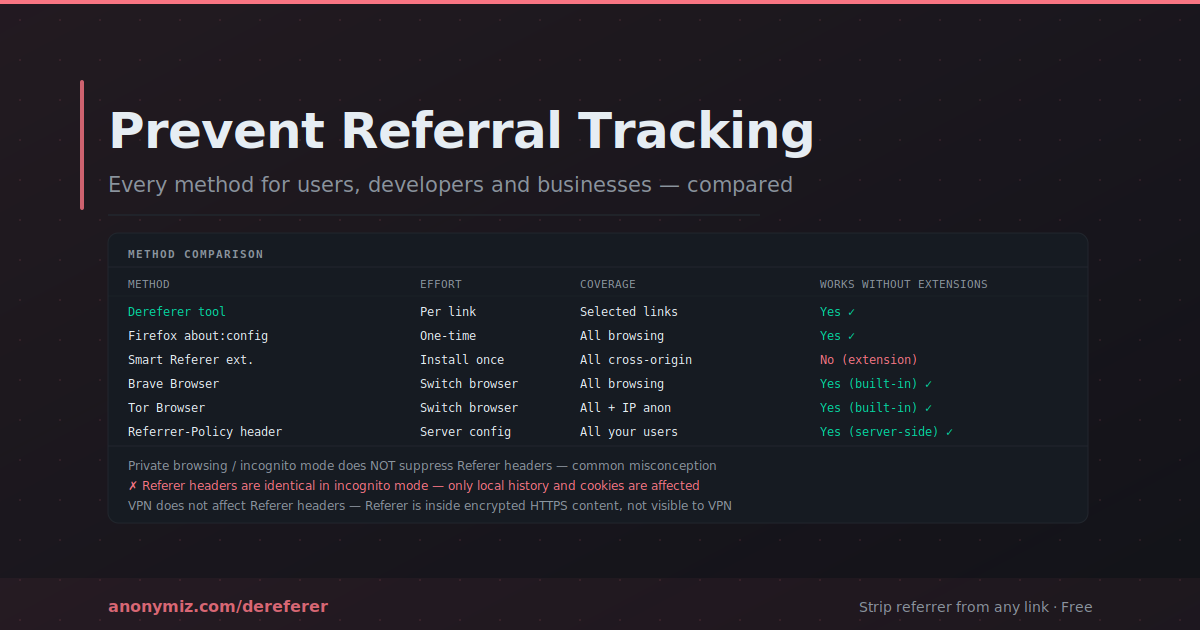
Private browsing — incognito mode in Chrome, private windows in Firefox and Safari — does not suppress Referer headers. This is a common misconception. Private browsing prevents your browser from saving local history, cookies, and cached files, but it does not modify outgoing HTTP headers. You send exactly the same Referer data in private mode as in normal browsing.
The only referral-related benefit of private browsing is that third-party tracking cookies set in private sessions are isolated from your main browser session and are deleted when the private window closes. This limits cross-session cookie-based tracking but has no effect on Referer-based tracking within a session.
Comparing the Methods
| Method | Effort | Coverage | Works Without Extensions |
|---|---|---|---|
| Dereferer tool | Per link | Selected links only | Yes |
| Firefox about:config | One-time setup | All browsing | Yes (Firefox only) |
| Smart Referer extension | Install once | All cross-origin navigation | No |
| Brave Browser | Switch browser | All browsing | Yes (built-in) |
| Tor Browser | Switch browser | All browsing + IP | Yes (built-in) |
| Referrer-Policy header | Server setup | All users of your site | Yes (server-side) |
The Layered Privacy Approach
Preventing referral tracking is most effective as part of a layered privacy strategy rather than as a standalone measure. Referer suppression prevents destination sites from knowing your navigation path. Combined with IP anonymisation (VPN), tracker blocking (uBlock Origin), fingerprint resistance (Brave or Firefox), and cookie management, you substantially reduce the data available for online tracking profiles.
No single tool eliminates all tracking. The goal is to raise the cost and reduce the precision of tracking to the point where it ceases to be commercially viable to target you individually — and that goal is achievable with the combination of methods described in this guide.
Frequently Asked Questions
Will preventing referral tracking break any websites I use?
The Smart Referer extension and strict-origin-when-cross-origin browser default are designed to minimise breakage. The most likely issues are: CSRF-protected forms that validate Referer (rare in well-designed modern applications), social media bypass paywalls that require a social Referer, and image hotlink checks that verify Referer is your domain. In practice, casual users rarely encounter these issues with moderate Referer restriction settings.
Does my VPN provider see my Referer headers?
No. HTTP headers are part of the encrypted traffic content, not the metadata. Your VPN can see that you are making HTTPS connections to specific IP addresses, but cannot read the contents of those encrypted connections including headers. Your ISP also cannot see Referer headers for HTTPS traffic. The Referer is visible only to the destination server at the end of the encrypted connection.
Is referral tracking the same as referral marketing?
No — they use the same word but describe completely different things. Referral tracking in the context of this guide refers to the HTTP Referer header mechanism. Referral marketing refers to programs where existing customers refer new customers — typically tracked through unique referral codes rather than HTTP headers. A referral marketing link might use an HTTP Referer header incidentally, but the marketing program itself operates through explicit referral codes in the URL.


