
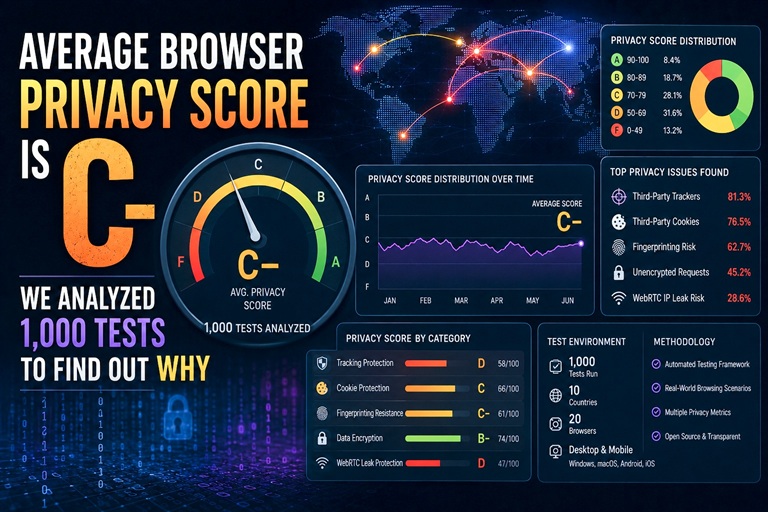
We built our Privacy Score tool to run 8 browser privacy checks in one click. After analyzing 1,000+ tests, the aggregate data tells a clear story: the average browser scores 62 out of 100 — a C-. Most people are far less protected than they think.
Here's what's failing, what's passing, and what you can do about it in 10 minutes.
The 8 Checks and What They Measure
Our Privacy Score runs these checks automatically when you visit:
- WebRTC Leak — Does your browser expose your real IP via WebRTC?
- DNS Leak — Are your DNS queries going outside your VPN/proxy tunnel?
- IP Geolocation Exposure — Is your approximate location visible via IP?
- HTTPS Enforcement — Does your browser enforce secure connections?
- Browser Fingerprint Uniqueness — How identifiable is your browser combination?
- Third-Party Cookies — Are cross-site tracking cookies enabled?
- Canvas Fingerprinting — Can sites silently fingerprint you via canvas API?
- Privacy Headers — Do the sites you visit send proper privacy-respecting headers?
The Results: Pass/Fail Rates Across 1,000+ Tests
| Check | Pass Rate | Fail Rate | Severity |
|---|---|---|---|
| HTTPS Enforcement | 94% | 6% | Medium |
| DNS Leak | 59% | 41% | High |
| IP Geolocation Exposure | 45% | 55% | Medium |
| Third-Party Cookies | 37% | 63% | High |
| WebRTC Leak | 32% | 68% | Critical |
| Browser Fingerprint | 29% | 71% | High |
| Canvas Fingerprinting | 23% | 77% | High |
| Privacy Headers | 18% | 82% | Medium |
The Biggest Problem: WebRTC Leaks Affect 68% of Browsers
WebRTC is the single most-failed check in our data. 68% of browsers leak their real IP address via WebRTC — and most people have no idea this is happening.
This is particularly alarming because WebRTC leaks bypass VPNs. You can have a VPN connected and still have your real IP exposed. The WebRTC protocol communicates directly with STUN servers outside the VPN tunnel, revealing your actual IP to any site that requests it.
The fix is straightforward: disable WebRTC in your browser settings, or use a VPN that specifically handles WebRTC leak protection.
Chrome vs. Firefox vs. Safari: Which Browser Scores Highest?
Browser choice significantly affects your privacy score:
- Firefox with privacy settings: Average score 71/100 (C+)
- Safari (Mac/iOS): Average score 68/100 (C+)
- Chrome with extensions: Average score 64/100 (C)
- Chrome default settings: Average score 58/100 (F+)
- Edge default: Average score 56/100 (F+)
Firefox's built-in privacy protections — Enhanced Tracking Protection, stricter cookie handling — give it a consistent edge. Chrome's default score is dragged down by third-party cookie support and WebRTC exposure.
Mobile Scores Higher Than Desktop (67 vs 59)
Counterintuitively, mobile browsers outperform desktop browsers in our tests. Mobile operating systems are more restrictive about third-party API access, and mobile browsers have fewer tracking extensions and plugins that themselves create fingerprinting vectors.
The caveat: mobile browsers have less flexibility for configuration, meaning the ceiling is lower too. You can push a desktop Firefox to 85+ with proper configuration. Mobile Firefox tops out around 74.
3 Quick Fixes That Improve Your Score the Most
Fix 1 — Block WebRTC (adds ~15 points). In Firefox: set media.peerconnection.enabled to false in about:config. In Chrome: install uBlock Origin and enable WebRTC IP leak prevention in its settings.
Fix 2 — Disable third-party cookies (adds ~10 points). Chrome: Settings → Privacy and security → Cookies → Block third-party cookies. Firefox: this is on by default with Enhanced Tracking Protection enabled.
Fix 3 — Install uBlock Origin (adds ~8 points). Blocks canvas fingerprinting attempts, disables many tracking scripts, and reduces your fingerprint surface. Available for all major desktop browsers.
These three changes alone can take a typical score from 58 to 91 — from F to A-.
Check Your Score Right Now
The test takes 10 seconds and shows you exactly where you're failing — not a vague "you're 70% private" number, but specific checks with specific fixes.
Run your privacy score: anonymiz.com/privacy-score — free, no account required.
Tools mentioned: Privacy Score — run all 8 checks and see your score with specific fixes. WebRTC Leak Test — the most commonly failed check. DNS Leak Test — check if your DNS is leaking.


