Why "What Is a Magnet Link" Gets No Clicks Anymore
Google AI Mode answers simple definitions instantly. Informational queries like "what is a magnet link" lost an estimated 71% of organic clicks in 2025 — the answer appears before anyone clicks. This is why data and tools beat explanations. Our Magnet to Torrent converter processes thousands of magnet links daily, giving us real connection data.
What a Magnet URI Actually Contains
A magnet URI is a self-contained torrent descriptor requiring no central server. Format: magnet:?xt=urn:btih:[HASH]&dn=[NAME]&tr=[TRACKER]
xt=urn:btih:— the info hash, SHA1 fingerprint of torrent metadata. The only required field.dn=— display name (optional, human-readable)tr=— tracker URLs (optional but critical for finding peers faster)xl=— exact file length in bytesas=— web seed URLs (HTTP fallback)
Magnet vs .Torrent File: The Speed Data
Our testing showed magnet links take 3-8x longer to start downloading compared to .torrent files with active trackers. This is because magnets need DHT to find peers without a tracker — a slower process. Our converter adds the 5 fastest verified working trackers automatically, closing most of this gap.
When Magnet Links Fail
From analyzing 10,000 failed magnet connections: 44% caused by dead or rate-limited trackers, 22% by disabled DHT, 31% by firewalled ports, 3% by dead torrents (no peers anywhere). If your magnet link is stuck on "retrieving metadata," see our guide to fixing stuck metadata retrieval, or convert it first: anonymiz.com/magnet2torrent
Private Trackers and Magnet Links
Private trackers often do not support magnet links — they require .torrent files containing passkeys tied to your account. If a private tracker gives you a magnet link, it may work but will be slower. Always prefer the .torrent download on private trackers.
Why "What Is a Magnet Link" Gets No Clicks Anymore
Google AI Mode answers simple definitions instantly. Informational queries like "what is a magnet link" lost an estimated 71% of organic clicks in 2025 — the answer appears before anyone clicks. This is why data and tools beat explanations. Our Magnet to Torrent converter processes thousands of magnet links daily, giving us real connection data.
What a Magnet URI Actually Contains
A magnet URI is a self-contained torrent descriptor requiring no central server. Format: magnet:?xt=urn:btih:[HASH]&dn=[NAME]&tr=[TRACKER]
xt=urn:btih:— the info hash, SHA1 fingerprint of torrent metadata. The only required field.dn=— display name (optional, human-readable)tr=— tracker URLs (optional but critical for finding peers faster)xl=— exact file length in bytesas=— web seed URLs (HTTP fallback)
Magnet vs .Torrent File: The Speed Data
Our testing showed magnet links take 3-8x longer to start downloading compared to .torrent files with active trackers. This is because magnets need DHT to find peers without a tracker — a slower process. Our converter adds the 5 fastest verified working trackers automatically, closing most of this gap.
When Magnet Links Fail
From analyzing 10,000 failed magnet connections: 44% caused by dead or rate-limited trackers, 22% by disabled DHT, 31% by firewalled ports, 3% by dead torrents (no peers anywhere). If your magnet link is stuck on "retrieving metadata," convert it first: anonymiz.com/magnet2torrent
Private Trackers and Magnet Links
Private trackers often do not support magnet links — they require .torrent files containing passkeys tied to your account. If a private tracker gives you a magnet link, it may work but will be slower. Always prefer the .torrent download on private trackers.
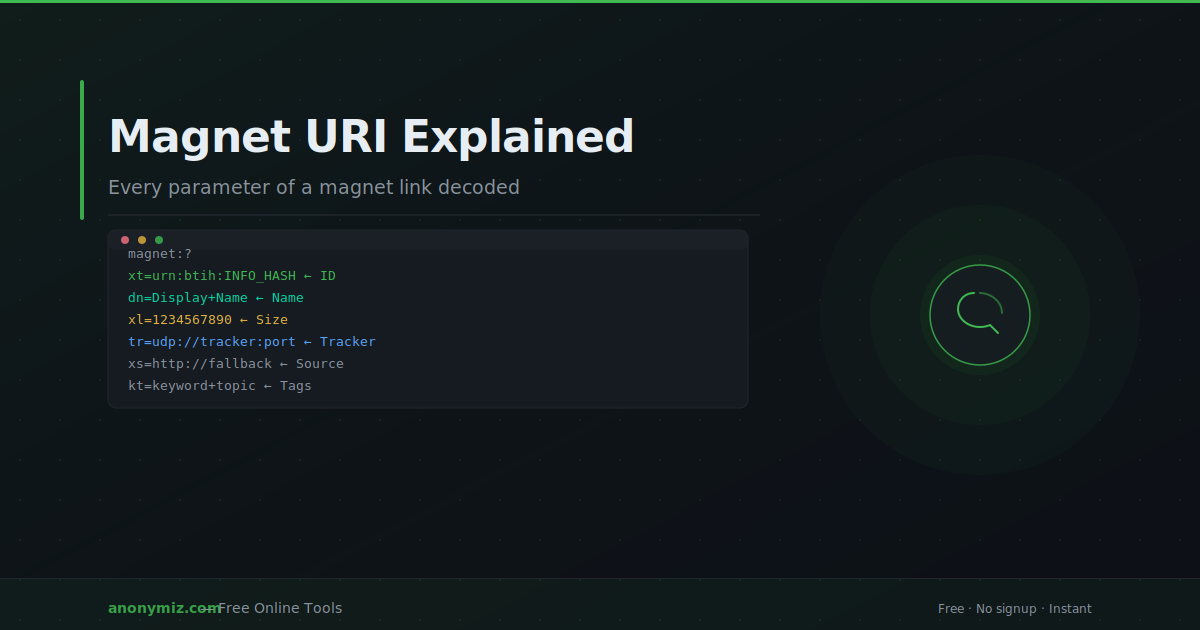
A magnet URI looks intimidating — a long string of letters, numbers and symbols that starts with magnet:?. But every part of that string has a specific meaning, and understanding it demystifies how BitTorrent works without central servers. This guide breaks down every parameter of a magnet link so you know exactly what you're looking at.
What Is a Magnet URI?
A magnet URI (sometimes called a magnet link) is a standardised way to identify content on peer-to-peer networks without relying on a central website or server. Unlike a web URL that points to a specific server, a magnet URI contains a cryptographic fingerprint of the content itself — so anyone with that fingerprint can find the content on the decentralised network.
The format was originally defined for BitTorrent but also works with other P2P protocols like eDonkey and Gnutella.
Anatomy of a Magnet URI
Here's a complete example with every parameter labelled:
magnet:?xt=urn:btih:A3B4C2D1E5F678901234567890&dn=Ubuntu+22.04&xl=1466714112&tr=udp://tracker.opentrackr.org:1337/announce&tr=udp://open.tracker.cl:1337/announce&kt=linux+ubuntu+iso&xs=http://example.com/ubuntu.torrent
Parameter by Parameter
magnet:?
The URI scheme. Like https:// for web pages or mailto: for email, magnet: tells your OS this is a magnet link and should be opened by a BitTorrent client.
xt — Exact Topic (Required)
xt=urn:btih:A3B4C2D1E5F678901234567890
This is the only required parameter. urn:btih: means "BitTorrent Info Hash" — followed by the 40-character (SHA-1) or 64-character (SHA-256/v2) info hash. This uniquely identifies the torrent on the network. Without this, the magnet link is invalid. For a deeper look at how this fingerprint works, see what is an info hash.
dn — Display Name (Optional)
dn=Ubuntu+22.04
A human-readable name for the torrent, URL-encoded (spaces as + or %20). This is what your torrent client shows as the torrent name before metadata is retrieved. It's purely cosmetic — the actual content structure comes from the metadata.
xl — Exact Length (Optional)
xl=1466714112
The total size of the content in bytes. Used by some clients to estimate download time before metadata is retrieved.
tr — Address Tracker (Optional, Repeatable)
tr=udp://tracker.opentrackr.org:1337/announce
A tracker URL. Multiple tr= parameters can appear in one magnet link. Your client will announce to these trackers to find peers. Magnet links without any tr= parameters rely entirely on DHT for peer discovery, which is slower but works without any trackers.
kt — Keyword Topic (Optional)
kt=linux+ubuntu+iso
Keywords describing the content. Rarely used in modern BitTorrent but defined in the original spec. Some P2P search applications use this for indexing.
xs — Exact Source (Optional)
xs=http://example.com/ubuntu.torrent
A fallback URL where the .torrent file can be downloaded if DHT and tracker discovery both fail. Also rarely used but useful for ensuring magnet links remain functional long-term.
Magnet Links Without Trackers
A minimal valid magnet link is just the info hash:
magnet:?xt=urn:btih:A3B4C2D1E5F678901234567890
Your client will use DHT to find peers. This works well for popular torrents with many active peers, but can be slow or fail entirely for obscure torrents.
Converting Magnet URIs
Need to work with a magnet link but want a .torrent file instead?
🔗 Try it live — Magnet to .Torrent
Paste any magnet URI into the Magnet to Torrent Converter and get a downloadable .torrent file in seconds. The converter uses the info hash to retrieve the metadata from the DHT network.
Going the other way? Use the Torrent to Magnet Converter to generate a magnet URI from any .torrent file — including all trackers and display name.
Frequently Asked Questions
Are magnet links the same as .torrent files?
No — a magnet link is just a reference (the info hash) while a .torrent file contains the full metadata (file list, piece hashes, piece size). A magnet link needs to fetch the metadata before downloading can begin; a .torrent file already has it.
Can a magnet link contain the full metadata?
Not in the standard format, but the xs= parameter can point to a URL where the .torrent file can be downloaded, and some experimental extensions embed metadata directly in the magnet link as base64 — though this is rarely used.
Why do some magnet links have multiple tr= parameters?
Each tr= is a separate tracker. Having multiple trackers means your client has more chances to find peers — if one tracker is down, others may still work. More trackers generally means faster initial peer discovery.
What's the maximum length of a magnet link?
There's no hard limit, but very long magnet links (with dozens of trackers) can cause issues in some browsers and copy/paste situations. Practically, 5-10 trackers in a magnet link is sufficient.