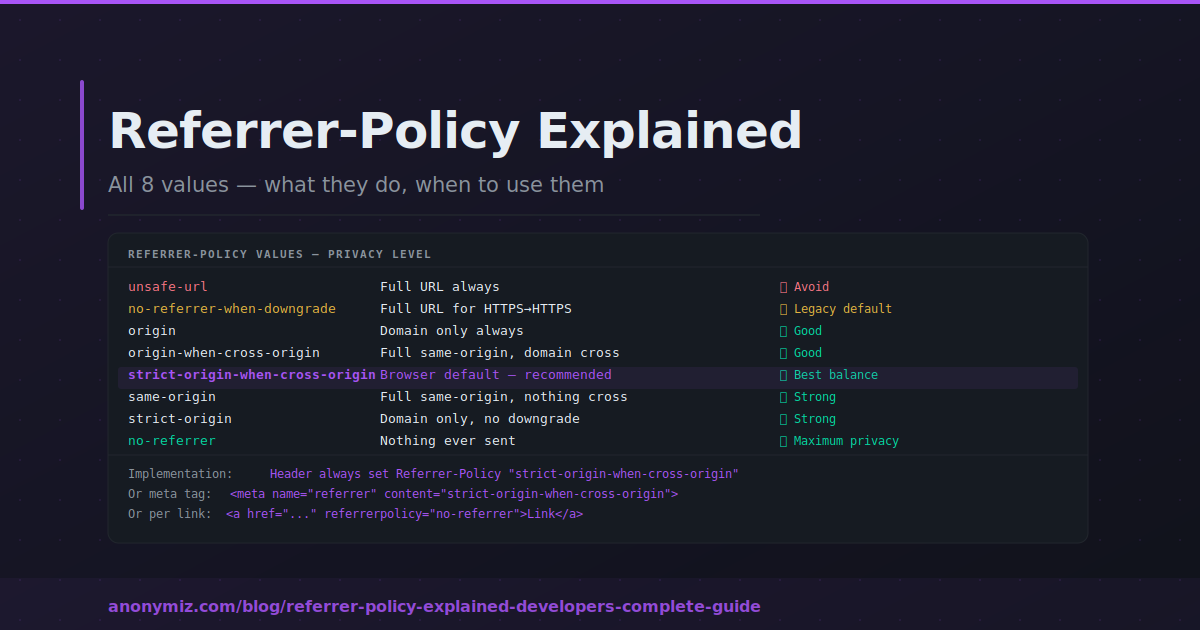
The Referrer-Policy HTTP header controls exactly how much information about your page URL is transmitted to external sites when users click links. Getting it right protects your users and your site's internal structure. This guide covers every value, how to implement it, and which policy to choose.
What the Referrer-Policy Header Does
When a user clicks an external link, their browser sends a Referer header containing your page URL to the destination. The Referrer-Policy header — sent in your server's HTTP responses — instructs the browser how much of your URL to include. Your page URLs may contain sensitive data: session tokens, search terms, A/B test IDs, user identifiers. Without a policy, all of this reaches every external destination.
The Eight Values
unsafe-url
Sends the full URL always. Never use this — it is the least private option and sends sensitive query parameters to every external site including HTTP destinations.
no-referrer-when-downgrade
Full URL for HTTPS-to-HTTPS, nothing for HTTPS-to-HTTP. The old browser default. Since most of the web is now HTTPS, this provides minimal protection.
origin
Sends only the scheme and host — https://yoursite.com — for all requests. External sites know your domain referred them but never see the specific page. Good for affiliate and content partnerships.
origin-when-cross-origin
Full URL for same-origin requests, origin only for cross-origin. Your own analytics see full referrer data; external destinations see only your domain. A good balance for sites with internal analytics needs.
same-origin
Full URL for same-origin, nothing for cross-origin. Maximum privacy for outbound links — external sites receive no Referer. Internal analytics and CSRF protection retain full data.
strict-origin
Origin only for same-protocol, nothing for HTTPS-to-HTTP. Similar to origin but with downgrade protection. Good for signalling your domain to partner sites without exposing page paths.
strict-origin-when-cross-origin
Full URL for same-origin, origin for cross-origin HTTPS-to-HTTPS, nothing for HTTPS-to-HTTP. This is the current browser default — a well-balanced policy that most websites can use without any user-visible impact. Explicitly setting it ensures consistency regardless of future browser default changes.
no-referrer
Nothing sent ever. Maximum privacy. May break CSRF protections that validate the Referer header, and removes all traffic source data for outbound analytics.
Implementation
As an HTTP header in Apache: Header always set Referrer-Policy "strict-origin-when-cross-origin"
In Nginx: add_header Referrer-Policy "strict-origin-when-cross-origin" always;
In PHP: header('Referrer-Policy: strict-origin-when-cross-origin');
As a meta tag per page: <meta name="referrer" content="strict-origin-when-cross-origin">
Per individual link: <a href="https://external.com" referrerpolicy="no-referrer">Link</a>
Which Policy to Choose
| Website Type | Recommended Policy |
|---|---|
| General commercial website | strict-origin-when-cross-origin |
| Healthcare or legal | same-origin or no-referrer |
| Affiliate site | origin-when-cross-origin |
| E-commerce | origin-when-cross-origin |
| Developer tools / privacy focused | same-origin |
Testing Your Policy
After implementing, verify using Chrome DevTools Network panel — inspect any page request and look for Referrer-Policy in Response Headers. Or use the Anonymiz Meta Tag Checker to inspect your full HTTP header response. Command line: curl -I https://yoursite.com | grep -i referrer
Frequently Asked Questions
If I set no Referrer-Policy what happens?
Browsers fall back to their built-in default — strict-origin-when-cross-origin for all major browsers. Explicitly setting the header is better practice as it guarantees consistent behaviour regardless of browser default changes.
Does Referrer-Policy affect images and scripts?
Yes — it applies to all outgoing requests from your page including images, scripts, fonts and other subresources. When your page loads an external image, the image server receives a Referer subject to your policy.
Can I set different policies for different pages?
Yes — use meta tags in individual page heads to override the HTTP header for specific pages. Useful if most pages should use strict-origin-when-cross-origin but a page with sensitive URL parameters needs no-referrer.