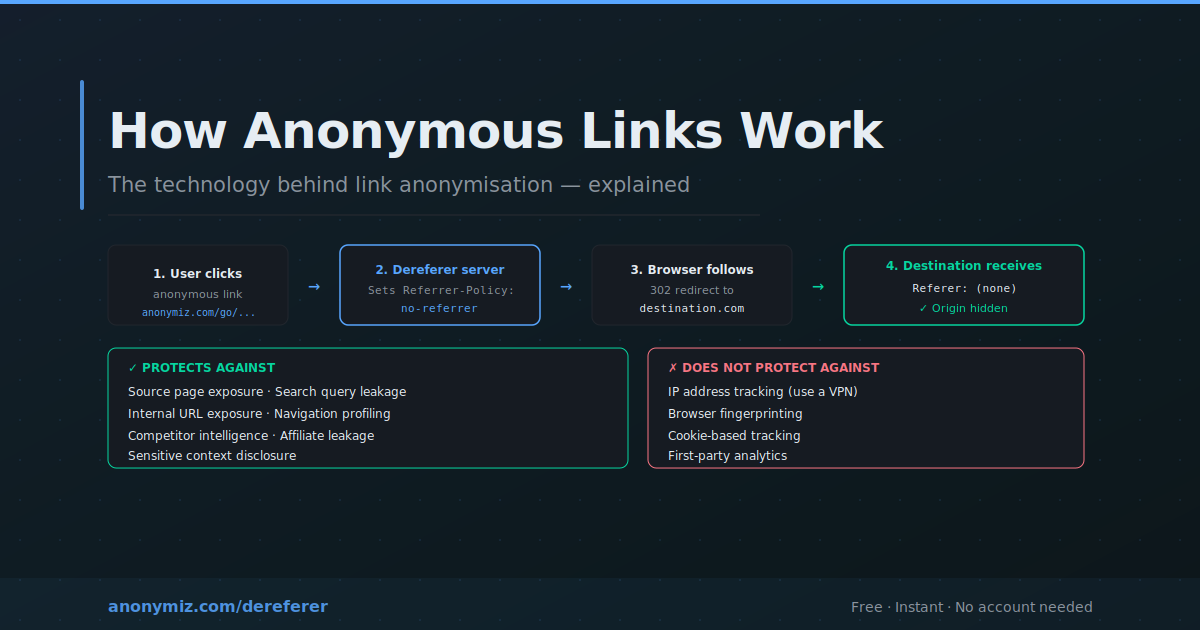
An anonymous link is a URL that has been modified so clicking it does not reveal to the destination website where the click came from. The destination still receives the visit — but the HTTP Referer header is suppressed or stripped entirely. Understanding how this works matters for anyone sharing links professionally, managing affiliate campaigns, or building privacy-conscious applications.
The Problem Anonymous Links Solve
The HTTP Referer header was added to the protocol in 1996. Three decades later it is used by advertising networks and data brokers to build browsing profiles. Every link click carrying a Referer is a data point that gets logged and aggregated. Anonymous links break this chain — allowing navigation without the destination learning anything about the origin.
Technique 1: HTTP Redirect with no-referrer Policy
The most common technique. The user clicks an anonymous link pointing to the dereferer service. The server responds with a 302 redirect and includes Referrer-Policy: no-referrer. The browser, following the redirect, makes a new request to the destination omitting the Referer header. The destination receives a visit with no Referer.
This is how the Anonymiz Dereferer works — reliable, works with all modern browsers without configuration changes.
Technique 2: Client-Side JavaScript Redirect
Uses a meta tag like <meta name="referrer" content="no-referrer"> combined with JavaScript navigation. The browser applies the no-referrer policy when making the navigation request. Slightly more overhead than a pure HTTP redirect but more flexible for intermediate processing.
Technique 3: Referrer-Policy on Your Own Site
If you run a website and want all outbound links anonymous by default, set a Referrer-Policy header in your server responses. Setting it to same-origin or no-referrer-when-cross-origin means users clicking external links never expose which specific page they were on — protecting all users automatically without changing link URLs.
What Anonymous Links Protect Against
- Source page exposure — destination cannot see which page sent the click
- Search query leakage — terms in Referer headers are stripped
- Internal system exposure — corporate intranet URLs stay private
- Navigation pattern tracking — reduces data for cross-site profiling
- Competitor intelligence — affiliate and marketing links are opaque
What Anonymous Links Do NOT Protect Against
- IP address — use a VPN for IP-level anonymisation
- Browser fingerprinting — canvas, WebGL, font signals still transmitted
- Cookie-based tracking — existing cookies still identify return visitors
- First-party analytics on the destination site
How to Create an Anonymous Link
The simplest approach: use the Anonymiz Dereferer. Paste any URL and receive an anonymous link instantly. No account required. When clicked, the destination receives the visit with no referrer information. For developers: prepend your dereferer endpoint programmatically — https://anonymiz.com/dereferer?url= + encodeURIComponent(targetUrl).
Performance
A server-side dereferer adds one extra HTTP round-trip — typically 50 to 200ms. For performance-critical applications, setting Referrer-Policy directly on your server adds zero overhead. For most use cases the latency is imperceptible.
Frequently Asked Questions
Can the destination detect I used a dereferer?
The destination can detect that the Referer header is absent but cannot determine whether you used a dereferer, configured your browser, or navigated directly. A missing Referer is ambiguous.
Is this the same as using incognito mode?
No. Private browsing does not suppress Referer headers — you send exactly the same Referer data in incognito mode as in normal browsing. Only local history and cookies are affected by private mode.
Does a VPN hide the Referer?
No. A VPN encrypts traffic between your device and the VPN server but the VPN forwards your original HTTP requests including the Referer header unchanged. To suppress Referer data you need a dereferer or browser configuration.