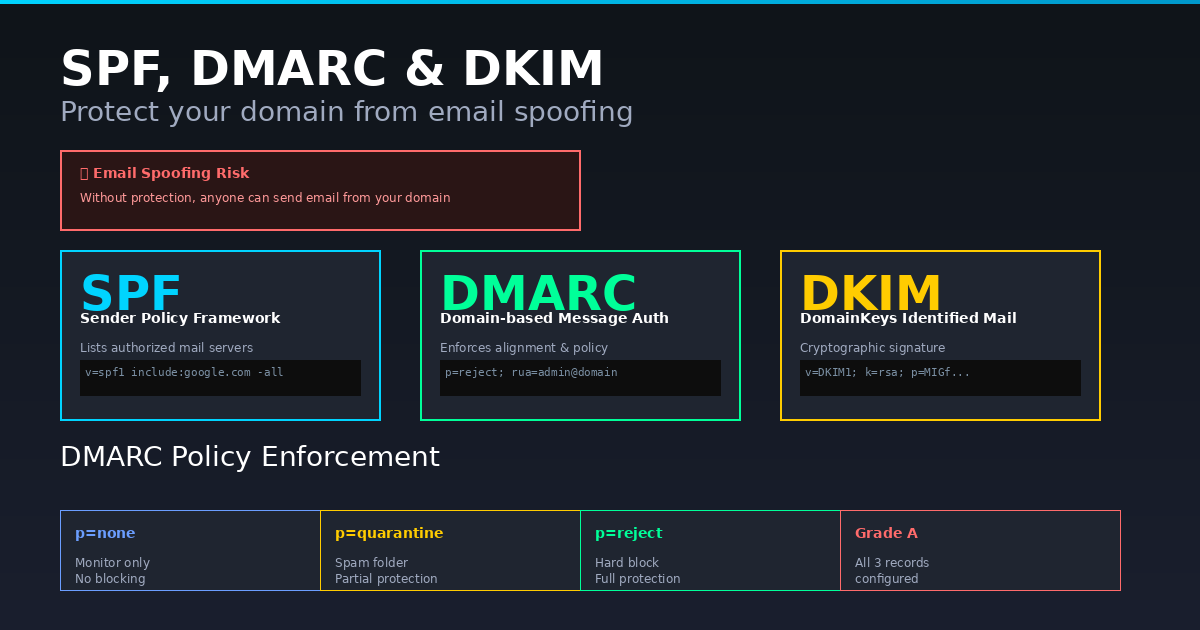
Email spoofing is one of the oldest phishing techniques. An attacker sends email appearing to come from your domain to scam your customers. Three DNS records prevent this: SPF, DMARC and DKIM. The SPF & DMARC Checker verifies all three for any domain instantly.
What Is SPF?
SPF (Sender Policy Framework) is a DNS TXT record listing IP addresses authorised to send email from your domain. A correctly configured SPF record ends with -all (hard fail) which tells receiving servers to reject unauthorised senders. Using +all is a critical misconfiguration that authorises every server on the internet to send from your domain.
What Is DMARC?
DMARC builds on SPF and DKIM to enforce what happens when authentication fails. Without DMARC, even a valid SPF record does not prevent spoofing because receiving servers are not required to act on SPF failures. DMARC has three policy levels: p=none (monitor only), p=quarantine (spam folder) and p=reject (block entirely). DMARC also enables aggregate reporting which sends XML reports showing exactly which servers are sending from your domain and whether they pass authentication.
What Is DKIM?
DKIM adds a cryptographic signature to outgoing emails. Your mail server signs each email with a private key, and the public key is published in a DNS TXT record. Receiving servers verify the signature confirming the email was not tampered with in transit. DKIM is configured in your email provider — Google Workspace, Microsoft 365, Mailchimp and all major ESPs support it.
The Correct Setup Order
Configure SPF first, then DKIM via your email provider, then add DMARC starting with p=none and an rua report address. Monitor reports for two to four weeks. Once all legitimate email passes, move to p=quarantine then p=reject. This graduated approach prevents accidentally blocking legitimate email.
Check Any Domain
The SPF & DMARC Checker fetches live DNS records for any domain, shows the full raw record, flags misconfigurations like +all or missing report addresses, auto-detects DKIM across common selectors and gives a security grade from A to F. Run it on your own domain, your competitors and any domain that sends email on your behalf.