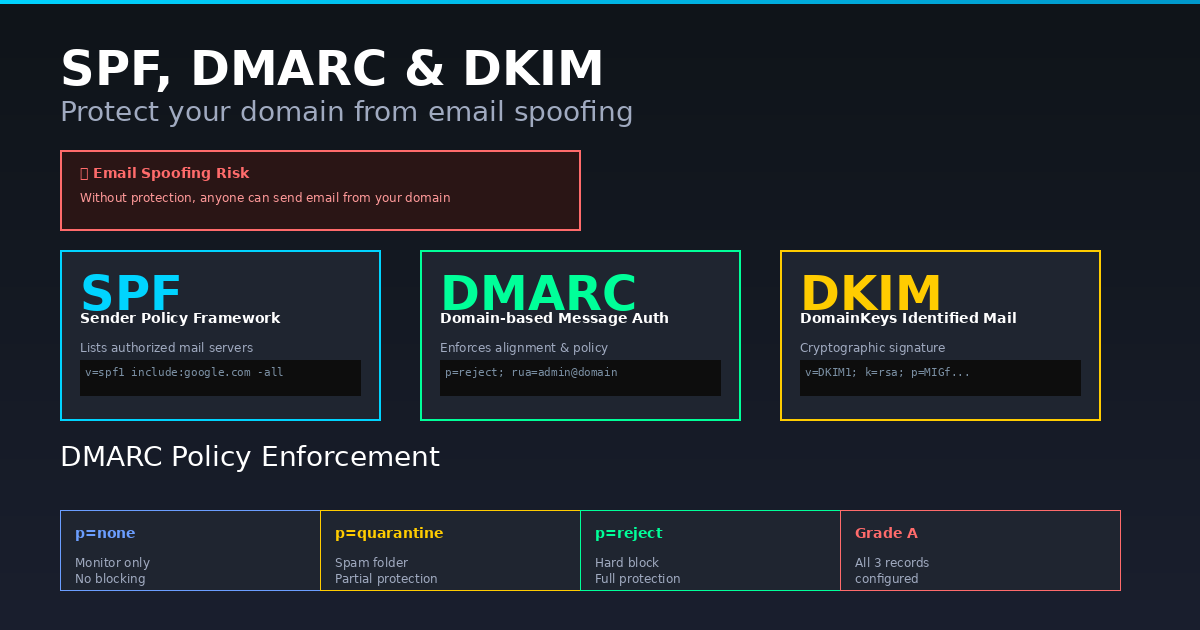
Anyone can send an email that appears to come from your domain. Without the right DNS records in place, a scammer can craft a message that looks exactly like it is from your company email address — and most email clients will display it without any warning. This is email spoofing, and it is the foundation of most phishing attacks.
Three DNS records protect against it: SPF, DMARC and DKIM. The Anonymiz SPF & DMARC Checker verifies all three for any domain and grades your email authentication setup instantly.
How Email Spoofing Works
The SMTP protocol that powers email was designed in 1982 with no authentication. The "From" field in an email is just a text string — any mail server can put any address there. When your email client displays a message from boss@yourcompany.com, it is showing you what the sender claimed, not what was verified.
SPF, DMARC and DKIM were invented to fix this. They use DNS records to tell receiving mail servers which senders are legitimate and what to do with messages that fail verification.
SPF — Sender Policy Framework
SPF is a DNS TXT record that lists every mail server authorised to send email from your domain. When a receiving server gets an email claiming to be from you, it checks your SPF record to see if the sending server is on the approved list.
A typical SPF record looks like: v=spf1 include:_spf.google.com include:sendgrid.net -all
The -all at the end is critical — it tells receiving servers to reject mail from any server not on the list. Without -all (or with +all), SPF provides no protection. ~all (soft fail) marks unauthorised mail as suspicious but still delivers it. -all (hard fail) rejects it outright.
DMARC — Domain-based Message Authentication
SPF alone is not enough. A common attack uses a different domain in the envelope sender while keeping your domain in the visible From header. DMARC closes this gap by requiring alignment between SPF and the visible From domain.
DMARC is a DNS TXT record at _dmarc.yourdomain.com. It tells receiving servers what to do when an email fails SPF or DKIM checks:
- p=none — Monitor only. Emails still deliver. You receive reports. Good starting point.
- p=quarantine — Failed emails go to spam. Significant protection.
- p=reject — Failed emails are blocked entirely. Full protection. The goal.
DMARC also lets you specify email addresses to receive aggregate reports (rua) and forensic reports (ruf), so you can see who is sending email on behalf of your domain — legitimate services and attackers alike.
DKIM — DomainKeys Identified Mail
DKIM adds a cryptographic signature to outgoing emails. The private key is held by your mail server; the public key is published in DNS. Receiving servers use the public key to verify the signature, confirming the email was sent by an authorised server and was not modified in transit.
Unlike SPF which checks the sending server IP, DKIM survives email forwarding — the signature travels with the message. This makes it more reliable for complex routing scenarios.
How to Check Your Domain
Enter your domain name in the SPF & DMARC Checker. The tool checks all three records and gives you a security grade from A (all records correctly configured with p=reject) to F (no records found). It also explains each finding — soft fail vs hard fail, missing rua address, low percentage enforcement and more.
How to Implement SPF, DMARC and DKIM
The recommended rollout sequence:
- Step 1 — Add SPF with -all. List all your legitimate sending services.
- Step 2 — Enable DKIM in your email provider (Google Workspace, Microsoft 365, SendGrid etc.) and add the public key to DNS.
- Step 3 — Add DMARC with p=none and an rua address. Monitor reports for 2-4 weeks.
- Step 4 — Move to p=quarantine at pct=10, then pct=100.
- Step 5 — Move to p=reject. Full protection achieved.
Rushing to p=reject without monitoring first can block legitimate email from services you forgot to add to SPF. The gradual rollout is important.
Check Any Domain
The free SPF & DMARC Checker works for any domain — your own, a supplier, a domain you are auditing or a phishing domain you want to investigate. No login needed, results in seconds.